Showing posts with label Microsoft. Show all posts

Dec 17, 2011

Microsoft buy Nokia - 3 reasons wont & 3 reasons it might

here is 3 reasons Microsoft won't buy Nokia:

1- Microsoft gains nothing in the deal
The simplest reason Microsoft won't buy Nokia is this: Microsoft gets nothing out of the deal. Microsoft already has what it wants out of Nokia -- that the world's largest phone manufacturer settle on Windows Phone 7 as its smartphone operating system. Why spend billions for something you've already got?

2- Microsoft would be buying businesses it has no interest in
Nokia makes a lot more than just smartphones, notably inexpensive, low-end phones. That's a business Microsoft has absolutely no interest in, and would gain nothing from owning. Why buy something that would just be a drag on your business and offer no strategic value?

3- Combining corporate cultures could be nightmarish
Whenever one company buys another, there's inevitable conflict as the two firms try to merge corporate cultures and business practices. Microsoft is at a crossroads right now, facing multiple challenges, most notably in mobile, Internet search, and the cloud. The last thing it needs is that type of distraction.
Now here is 3 reasons Microsoft may take the plunge and buy Nokia:
1- Patents, patents, patents
As Microsoft knows better than any company, patents have become powerful assets. Microsoft has sued or threatened to sue makers of Android cell phones based on what it claims are patent infringements, and has gotten hundreds of millions of dollars in returns. Adding Nokia's considerable number of patents on mobile phones would make Microsoft even more formidable.
2- Nokia could be bought relatively cheaply
Paulo Santos of the Seeking Alpha investing Web site claims that because of Nokia's market woes, Microsoft could buy Nokia relatively cheaply. He figures that even paying a 50% premium, Microsoft would pay $21 billion. Given that Nokia is sitting on what Santos says is $6.6 billion in cash, and that Microsoft would likely sell off Nokia's telecom equipment division, that's not an outrageous amount for what Microsoft would get. Consider that Google is buying the smaller Motorola Mobility for $12.5 billion, Microsoft could almost be considered as getting a good deal.
3- Microsoft needs to follow Apple's and Google's lead
With Google buying Motorola, Microsoft will be the only major maker of smartphone operating systems that doesn't also manufacture hardware. Apple, RIM, and now Google all make phone hardware as well as smartphone operating systems. As Apple has long shown, if you make the hardware and the software, you can design the best possible user experience. So in buying Nokia, Microsoft would be more likely to do the same.

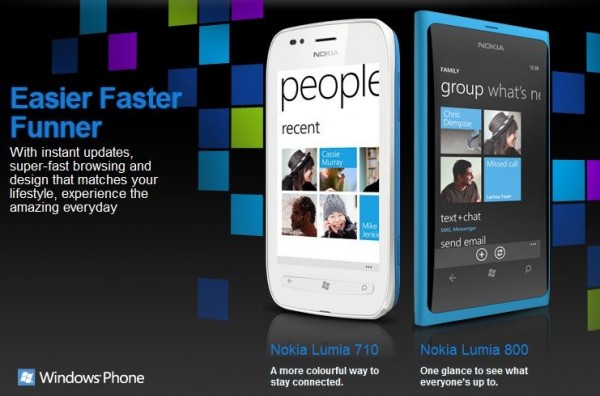
Can Nokia survive with Lumia Series?

Innovation and agility at both ends of the handset market: does this signal that Nokia is getting its act back together? Or do the achievements pale against the goings on in Apple, Samsung and local manufacturers in emerging economies?

For a moment, ignore Lumias' specifications (they don't read half bad). Don't compare them with other Windows Mango devices. Consider what it means for the company. From idea to the store shelf - the Lumia journey is a quick turnaround from handset industry standards. Benchmark it to the old Nokia, it looks like a sprint.

But the real mad dash was the slew of dual SIM phones. More than two years late into India and other emerging economies, the company has announced seven such phones since June. And though late, Nokia came good. It loaded the dual SIM phones with features: Ovi services and specific innovations. The result: it shipped over 18 million such phones since their launch.
Elop is already gushing. In a media interaction in September he claimed that the success of dual SIM phones had a "halo effect on our single-SIM phones. India has shown that brand plus team plus great execution can deliver strong results".
Nokia, which uses Symbian in its high-end smartphones, has struggled to make headway against Apple's iPhone and Android-powered phones in this highly lucrative segment. Earlier this year its CEO, Stephen Elop, described Symbian as burning platform and decided to join hands with Microsoft for the company's software needs.
Lumia 800, a handset that the firm is currently shipping to retailers in India, is Nokia's first smartphone running on Microsoft's Windows Phone operating system. Microsoft too is struggling against iPhone and Android but hopes with the reach and channel of companies like Nokia it will be able to improve the situation by the end of 2012.
ccording to IDC, Android saw a growth of 90% over the previous quarter. Apple iOS consolidated further, with a 3.09% share of the smartphone market, compared to 2.6% in Q2 2011. IDC said that overall Indian mobile phone market grew by 12% in units shipped, over the previous quarter, to clock 47.07 million units. Year-on-year, there was a shipment growth of 13.8%.

Tech News of 2011

The Blackest mark
BlackBerry went down and with it went the hopes and dreams of the company. People across the world lost access to mails, BlackBerry Messenger and confidence in the company. The effect was brutal and the handling of the situation was terrible. This was just one in a long string of problems for the company. From lower phone sales, disappointing OS upgrades and the failure of the PlayBook Tablet, the dark black clouds became thicker over RIM.

Effect: BBX (the new OS) is coming but it may not be enough. Many predict that BlackBerry will eventually have to move to Android with BlackBerry push mail and Messenger intact.

Light my Fire
In a one horse race, it’s easy to lose sight of the winning line. But the iPad has been Tunnel Vision in its focus. So focused that it dominated the entire market. iPad-killer after iPad-killer came and went. Till the Amazon Kindle Fire. It’s priced beautifully; it has content and an ecosystem in place and it has Amazon’s magic touch behind it. It also had a large market share within days.

Effect: Amazon, Samsung, Asus and Apple: it’s a four-pronged race now with each throwing in a giant compelling reason to buy their product. 2012 may bring Apple down to about 50 per cent, which in itself is also amazing.

It’s big, it’s there, it’s not, yes it is... no it’s gone!
The best OS, the biggest hardware manufacturer, the buzz as big as Apple and a product that looked like a million bucks. The HP TouchPad came, made news and was killed – all in the blink of an eye. Some truly disastrous seat-of-the-pants decisions (a fire sale of the product and conflicting announcements) of the top HP brass led to the CEO getting the boot along with the TouchPad as well.

Effect: It could have been a five horse race but it’s not. HP could have taken Web OS to the top, but it won’t! HP, HP, HP – what have you done?

The World’s biggest and struggling
The world’s biggest mobile phone manufacturer gets into bed with the world’s biggest software manufacturer.

At stake: literally the future of both companies. Nokia and Microsoft join hands to come out with the Lumia series. The devices are good, the marketing is top notch and the money being spent is astronomical. Now the future of both lies in your hands.

Effect: If the predictions are true, ‘Micro-kia’ will be number 3 in 2012. If this doesn’t work out, well, it’s Game Over for both.

Tabletting the impossible
A Tablet that will cost a student just Rs1,000. The $35 Akash Tablet is the most controversial Tablet in the world. A wonder of out-sourcing, ingenuity, hard-nosed pricing and hype, the first Akash works but is underwhelming. It’s a great idea let down by some poor choices on hardware.

Effect: We are the only nation in the world to dream it and do it. By the time the much-improved Akash 2 hits the market (March 2012?), we may be the only country supplying Tablets to every nation in the world.

The Big G
Google dominated world headlines for all things good and bad. Google+ was the only competition to Facebook but seems to be losing momentum. Google bought out Motorola and made all other Android partners nervous. The first big OS threat to Windows was the Chrome OS. But it has petered out to a has-been already.

Effect: Google+ still has a big chance as it is doing most things right. The problem is that there is no real reason to leave Facebook. Motorola-Google will be the most aggressive mobile phone player of 2012.
The Chrome OS: can you say dodo?

(Link)

Aug 30, 2009

Win7 RTM Language Packs available via Windows Update

Microsoft has released all 35 language packs as optional updates via Windows Update for Windows 7 RTM. The following language packs are available for download:

Windows 7 RTM Language Packs now available via Windows Update

Arabic, Brazilian Portuguese, Bulgarian, Chinese – Simplified, Chinese – Traditional – Hong Kong, Croatian, Czech, Danish, Dutch, English, Estonian, Finnish, French, German, Greek, Hebrew, Hindi, Hungarian, Italian, Japanese, Korean, Lithuanian, Norwegian, Polish, Portuguese, Romanian, Russian, Serbian Latin, Slovak, Slovenian, Spanish, Swedish, Thai, Turkish, Ukrainian.  The Windows Blog noted that the “Traditional Chinese – Taiwan” language pack will be released at a later date. (story Link with thanks)

Windows Movie Maker 14 Officially Released

Movie Maker now uses the ribbon UI like Paint in Windows 7 and Office 2007.

Windows Movie Maker 14 Released

Windows Movie Maker 14 is out of beta and officially released. It can be downloaded through Windows Live Essentials Wave 3, Microsoft’s software suite. Many were wondering why Windows 7 was not bundled with applications such as Mail and Messenger that were part of Vista. They are now part of Windows Live Essentials that must be downloaded. Quick Fix Engineering (QFE) patches have also been released for all the Windows Live applications.

Aug 25, 2009

From Ubuntu to Windows 7, All the best OS for Netbooks

Netbooks have become a hugely popular hardware category. So much so, that netbooks have in some cases started to outsell laptops, considering their low prices, excellent portability and web centric approach.

But these mini machines are a lot different from our usual ultra powered laptops and notebooks. They have different hardware set ups from their laptop congeners and thus have different software needs. Keeping in view their moderately powered processors, these netbooks may not be able to handle the elephant that Vista is, though they can pick the load of his brother that we know as XP. But using an OS that is specifically built for a netbook has its own aura.

We will tell you about these Operating Systems that your netbook will just love to spend its day and night with.

Moblin

moblinMoblin is short for Mobile Desktop. It’s an open source project which aims to develop software for Mobile Internet Devices or, Netbooks and Nettops. Moblin is the brainchild of the people behind this initiative and Moblin.org. Built on a customized Linux build, it uses a tailor-made Gnome environment. It’s still in development, with V2.0 Beta already in the market. Targeting netbooks, Moblin is specifically designed for Intel Atom processors, that most netbooks are based on. With version 2, Moblin has brought an intuitive and easy to use user interface, built for a better media and social networking experience. It also sports a new graphical shell designed to provide the best experience on netbook devices and the likes. The bar placed on the top of the desktop holds different panels called ‘zones’. Each zone holds applications for different uses. Web surfing is handled by Moblin's self customized browser which is based on Mozilla’s Gecko engine. The media library can be browsed from the top bar from where a user can access music, videos and image gallery.

The connectivity can’t be ignored. With Moblin, you can easily create connections, whether Wifi, 3G, WiMax or a wired one. All of this is handled from the top panel. The home screen, that you see above, shows recent appointments and tasks. It also shows tabs of recently visited websites and messages from social media websites. Last.fm and twitter are supported till now and more should be added as Moblin progresses out of beta. Twitter is also integrated within the panel from where a user can quickly update his status. Moblin can be downloaded from here, although note that it is still in development and may cause some glitches.

Ubuntu Netbook Remix

netbook_remix

Ubuntu Netbook Remix is simply a spin-off of the original Ubuntu, customized for Netbooks and similar devices. With Ubuntu at it’s heart, you will get the security, user friendliness and customization options that Ubuntu promises.

Specifically designed for netbooks, the Netbook Remix has an intuitive interface with large icons and buttons, making it easy to ‘tap on’ with fingers when the OS is used with a touchpad friendly monitor. The default install takes up nearly 2GB, clearly disappointing users with 2GB EEE PCs. But considering the netbooks that come these days, with large volume hard drives and SSDs, this won’t be a problem at all. It comes with most of the default Gnome applications. OpenOffice.org, Firefox, Evolution all come bundled and the Gnome Web cam app, Cheese is also packed which works out of the box. The current version is 9.04 Jaunty Jackalope. corresponding to the desktop release. It’s just another Ubuntu release (tuned up a bit though) and you should expect it to work like one. The Ubuntu Netbook Remix supports many popular netbook models like Asus Aspire One, Asus EEE 1000, 1000H, 900a & 901, Dell Mini 9 & 10v and a lot more.

Facebook and Twitter apps coming for Xbox Live

A new feature for the Xbox Live Dashboard was announced at E3 recently where Microsoft took the stage to show off a full Facebook integration on the Xbox Live. With this new update you can do all kinds of the social cliche stuff, like link up your Facebook friends and Xbox Live friends, and upload and share photos, or can even update your status right from your console.

facebook-xbox-500x281 01

Apart from this, a Twitter integration was also announced. Everything you do from your PC to keep in touch with the world can now be done right from your console.

twitter-on-xbox-500x281 02Microsoft later on however stated that the Twitter and Facebook integrations for Xbox 360 will be individual apps instead of being part of a general dashboard update.

One of Microsoft’s marketing people, James Halton said the company is aiming for a release date around Autumn, but didn’t specify beyond that. He did although mention that say "it will be before Christmas" so there you have it, Facebook and twitter addicts can start pouncing on their consoles before this fall.

Aug 23, 2009

Dell releases first set of Windows 7 Drivers

Windows 7 drivers for Dell products are often sought after and finally, there’s an answer. Dell has started posting their first set of certified Windows 7 Drivers for its commercial desktop and laptop products. The Dell Community blog states that they still have additional drivers to release and to check back if a certain Windows 7 driver is not listed.

Dell releases first set of Windows 7 Drivers

Driver support from third-party vendors is critical to the success of Windows 7 as we have learned from the Vista catastrophe. As Dell pushes their drivers for release, hopefully other parties will be making their hardware and utilities officially compatible with Windows 7. I’m talking to you, Punkbuster.

Windows 7 Bundle Covers

http://rapidshare.com/files/267358652/w7modifcovers.rar


Jul 21, 2009

Xbox Handheld Coming

Shortly before the 2009 Electronic Entertainment Expo, rumors surfaced that Microsoft was on the verge of announcing the ZuneX.

The ZuneX was purported to be a gaming handheld that integrated with Xbox Live Arcade and "ZuneX originals" and featured mobile-phone capabilities. That's a marked contrast from the current generation, which offers only a half-dozen games despite promises of titles that would be transferable from the Xbox 360.

The Xbox 360 may soon have a small, sleeker sibling.

With that rumor quickly marginalized as a phony by many industry watchers, Microsoft has now once again signaled that its portable gaming ambitions may extend beyond the struggling Zune. In an interview with gaming site Kikizo, Microsoft executive Shane Kim said that the Xbox brand is destined for the mobile platform.

"For us, it's a matter of focusing on 'when,' " said Kim, who transitioned from his role as head of Microsoft Game Studios to a strategic development position within the Interactive Entertainment and Devices division last year.

As for what's been holding up that "when," Kim said that the division has been focused on fleshing out the core Xbox 360 and Xbox Live experiences.

"If we chased after a mobile or handheld opportunity, we would not have the resources and ability to do things like instant-on 1080p HD, Facebook, Twitter, Project Natal," he said. "And so we've chosen to focus on the living room experience from a hardware standpoint, if you will, but we're building a service in Live that will...will extend to other platforms." [Emphasis in original.]

One other question facing the company is what form a mobile gaming device would take. "How do we enter into that market," pondered Kim. "Do we do our own device, do we create our own phone--that's a question for the company itself--do we continue to go down the Windows Mobile path, which is the path that we're on today, etcetera, etcetera."

Kim concluded by reemphasizing Microsoft's desire to be a player on all relevant platforms, whether that be consoles, desktops, or mobile devices.

This article was originally posted on GameSpot.com.

Windows Home Server Power Pack 3 Beta adds Win7 support

Microsoft announced the release of Windows Home Server Power Pack 3 Beta, along with news that it will feature Windows 7 support. The update will include several new features that take advantage of features in Windows 7:

Full Image-based Backups of Windows 7 PCs. After the Windows Home Server Connector is installed on your Windows 7 PCs, Action Center should no longer display that your files are not being backed up.

homeserver power pack 3 Windows 7 Libraries Support. Music, Photos and Videos shared folders from your Windows Home Server will be added to Windows 7 Libraries. Content saved to these shared folders will be able to be quickly accessed through your Windows 7 Libraries. And any application, like Windows Media Player and Windows Media Center, will be able to access content saved on your Windows Home Server through Libraries as well.

Windows Search 4 is now included. With Windows Search 4, PP3 offers improved query search times, indexing times and reliability. Easy search through a Library in Windows 7 with files stored in multiple locations.

Windows Media Center Enhancements. Archive old recorded TV shows onto your Windows Home Server in a variety of formats. Use Console Quick View to see statistics about your Windows Home Server through Windows Media Center.

  • Full Image-based Backups of Windows 7 PCs. After the Windows Home Server Connector is installed on your Windows 7 PCs, Action Center should no longer display that your files are not being backed up.
  • Windows 7 Libraries Support. Music, Photos and Videos shared folders from your Windows Home Server will be added to Windows 7 Libraries. Content saved to these shared folders will be able to be quickly accessed through your Windows 7 Libraries. And any application, like Windows Media Player and Windows Media Center, will be able to access content saved on your Windows Home Server through Libraries as well.
  • Windows Search 4 is now included. With Windows Search 4, PP3 offers improved query search times, indexing times and reliability. Easy search through a Library in Windows 7 with files stored in multiple locations.
  • Windows Media Center Enhancements. Archive old recorded TV shows onto your Windows Home Server in a variety of formats. Use Console Quick View to see statistics about your Windows Home Server through Windows Media Center.

There is no set release date for the Power Pack, but Microsoft states that it will be available shortly after the General Availability of Windows 7. If you’re interesting in being involved as a beta tester, you can sign up as a beta participant at Microsoft Connect. Exisiting Windows Home Server customers will receive Power Pack 3 for free via Windows Update.

For more in-depth information regarding the new features in Power Pack 3, head over to the Windows Home Server Team Blog.

Jul 17, 2009

MS Announces Volume Discounts for Win 7

Microsoft announced volume discounts on Windows 7 for its business customers at its Worldwide Partner Conference in New Orleans on Monday.
As of Sept. 1, business customers will be able to order Windows 7 through Microsoft's software licensing partners.  Microsoft will also offer customers up to a 15 percent discount to upgrade to Windows 7 Professional.

Microsoft Windows Partner Conference logo.JPGSpecifically, Microsoft will give a 15 percent discount on the Windows Vista-to-Windows 7 Professional upgrade to its Volume Licensing partners, who will have the choice to pass along the discount to corporate customers. The discount, according to a Microsoft spokeswoman, refers to the Volume Licensing price Microsoft previously charged to upgrade from either Windows XP Professional or Windows Vista Business to Windows 7 Professional -- a price Microsoft hasn't previously disclosed. The additional discount will represent 15 percent off of that price, she said. (Upgrading from Windows Vista to Windows 7 Professional costs $199.99 via retail.)
Specifically, Microsoft will offer discounts of between 15 and 35 percent, based on the volume and geographic region, Bill Veghte, senior vice president of Windows Business, told attendees at the Partner Conference, in a keynote address that Microsoft posted to the Web.

To determine whether customers are ready to deploy Windows 7, Microsoft is providing Solution Accelerators, automated tools to scan and remotely upgrade a network to Windows 7. A related tool, Microsoft Assessment and Planning Toolkit 4.0, will help consumers scan the network and determine if the hardware is compatible with both Windows 7 and Windows Server, or if an upgrade is required. (story Link)

Microsoft Office 2010 Technical Preview

Microsoft today released a "technical preview" release of Microsoft Office 2010, the next version of the world's most widely used application suite. The beta is available to anyone who preregistered with Microsoft for a chance to download and test it. After running it for a few days of intense testing, I'm impatient for the final release.

Hands On: Office 2010 Technical PreviewAs far as I can tell, this should be the smoothest upgrade for Office in many years. If you're used to Office 2007, you'll need no help using Office 2010. Old features remain where they were, although some are now displayed on spacious menus with lots of explanatory text instead of the cramped menus of 2007. In fact, the new features are slotted in so smoothly that it may take you a few moments to realize that they're new.

You'll see major changes in the new version if your company also updates to SharePoint Server 2010. Office 2010 is packed with features that let SharePoint users edit and manage each other's files either through an internal connection to a SharePoint server or remotely through a Web browser or smartphone. Microsoft's obvious goal is to persuade corporations to pay for Microsoft's collaboration tools instead of using those from Google or any other cloud-based service. Microsoft's look technically dazzling, but it's an open question whether Microsoft can convince companies to lock themselves into a high-priced proprietary offering in a time of economic uncertainty.

One other innovation is that Office 2010 will be the first version of the suite available in both 32- and 64-bit versions. We haven't received the 64-bit version yet, but we'll report on its performance on a 64-bit version of Windows as soon as we can.

Digging into Office 2010

If you haven't registered for the preview, the suite can be found on software-piracy sites—but Microsoft warns that many of these bootleg copies are infected with malware. If you're curious about the new version, don't risk compromising your Windows system. Just wait for the public beta that's slated for later this year. Otherwise, you can wait until the final code is released. Office 2010 won't ship in final form until sometime in 2010—Microsoft is tight-lipped about the exact date. Meanwhile, here's my initial take on what you can expect.

System requirements for Office 2010 are essentially the same as for Office 2007: Windows XP SP3 (the older SP2 won't cut it), Vista, or Windows 7. Any hardware that can run Office 2007 can also run Office 2010.

The first thing you'll notice is a lack of big, obvious changes to notice. Office 2007 introduced the ribbon interface for Word, Excel, PowerPoint, and Outlook's message editor. Office 2010 extends the ribbon throughout the suite, adding it to Publisher, OneNote, and Outlook's main menu—and introduces a customization feature that lets you add your own tab and remove some (but not all) items on the default ribbon.

Office 2007 introduced the pearl-like Office Button menu that worked like an enhanced version of the traditional File menu. Office 2010 replaces that button with a small, rectangular icon that opens a spacious "Backstage" page of fully explained options for saving, printing, and managing files, making it easier to plumb the depths of Office's enormous feature set. The Backstage view is essentially a single menu for accessing features that apply to the whole of a document, such as printing, saving, and sharing; the main editing screen is used for accessing all the actual data that's visible in the document. On the ribbon, a tiny up-arrow icon reminds you that you can temporarily turn off the ribbon by clicking that button—and you can, of course, still toggle the ribbon on and off with the little-known Ctrl-F1 keystroke introduced in Office 2007.

A new Print menu is especially impressive, with options like page orientation (portrait or landscape) and one- or two-sided printing instantly accessible instead of buried deep in the Windows Print dialog. PDF output is finally built in from the start, and doesn't require a special download as it does in Office 2007. The suite also includes the open-source Open Document Format as one of its default formats. (story Link)

after one Year Microsoft Will End Support For Windows XP SP2

One year from today Microsoft will retire support for Windows XP Service Pack 2. Windows XP is not being retired, but support for Service Pack 2 is. It may be the case, and in fact I would guess it would be the case, that from them on you will have to have Service Pack 3 in order get support, including patches to subsequently disclosed vulnerabilities.

xpsp3.jpgIt has been policy in the past for Microsoft to retire support for service packs. You can no longer get updates for XP with no service packs (what they call SP0) or with SP1. You must have SP2 in order to get updates. After Patch Tuesday, July 13, 2010 you will have to have SP3 installed in order to get updates for Windows XP. And in fact, if a vulnerability is found in SP2 that is not in SP3, it will not be patched.

And we have reached the end of the line for Windows XP service packs: After SP3 no new service packs are planned. Microsoft will not end support for Windows XP itself for almost 4 years more. That is scheduled for Patch Tuesday, April 8, 2014.

Given that SP3 was released in May 2008, this would mean 6 years of updates since the last service pack, which adds up to quite a mess. Deploying a new system under such circumstances requires a large update process. By then we should be on to Windows 8 or 9, but the determination among many of you to keep your XP systems forever seems strong. (story Link)

How to Choose the Best Web Browser

Today's Web browsers are faster and more feature-rich than ever before. If you're not sure which one you should use, our look at the most popular options will help prep you for prime surfing.

The recent launch of Firefox 3.5 was just the latest in a crescendo of activity on the browser front over the past few months. We've seen Google tout speed with its bare-bones Chrome 2. We've seen Apple's Safari 4 bring on both the speed and all the interface eye candy we've come to expect. Opera has come in with not only a beta of its feature-packed version 10, but also an alpha of an app called Opera Unite that makes the browser a server as well as a consumer. Starting it all was that juggernaut Microsoft, coming out with Internet Explorer 8, which the company claimed was more compliant with open Web standards.

But it turns out that standards are a far murkier issue than they may first seem. Firefox's promoters will brand IE as a completely behind-the-times, non-standards-supporting browser, but the standards Firefox supports haven't yet been ratified by the organization that's been the official keeper of the standards, the W3C. Firefox's support for the <video> tag is a good example: Though the tag itself is adopted by the W3C, the Ogg Theora video codec Firefox supports with the tag is anything but.

Rendering speed is another issue to consider when choosing a browser. Though all browsers today are much faster than they were a few years ago, the clear winner—at least as far as JavaScript rendering—is Chrome. JavaScript rendering is important for modern sites, which are behaving increasingly like applications rather than static pages. Chrome performed best in my tests using the SunSpider JavaScript Benchmark, finishing in just 1,503 ms. But Safari isn't far behind, at 1,707 ms, and Firefox is right in the mix, at 2,413 ms. The once-snappiest Opera trails at 7,974 ms, and IE8 is left in the dust with a 10,281-ms time.

In terms of features and customizability, Firefox, IE, Opera, and Safari all outshine the stripped-down Chrome. But no browser can come close to Firefox in both its extensions and theming capabilities. Mozilla's "Fashion My Firefox" and "Personas" tools make it simple for novice users to customize the browser to their hearts' content. IE also has an add-on capability, but there's nowhere near the ecosystem for it as there is for Firefox. True, only IE offers WebSlices and Accelerators, which deliver up-to-date data to you with little fuss, right inside the browser, but few sites currently support WebSlices. (full Story)

Blue Badge tool unlocks all known protected features in Win7

Blue Badge tool unlocks all known protected features in Windows 7

Last week, Rafael revealed a weird protection scheme around some unfinished features in Windows 7 (build 6801). Well now, he’s finally created a stable all-in-one tool that will unlock all the mentioned features: the new taskbar (superbar), gestures, panning, and Desktop Slideshows.

Before you go to install the patch, the patched files are not backed up. However, I have created a .bat file, which will automatically backup all the required files as long as you have installed Windows 7 on your C Drive, and your system 32 directory is located at C:WindowsSystem32
There is some risk involved so it’s very important that you backup these files.

You can download the .bat file for backup here

Just choose the save option, and double-click it. The .bat file will create a new directory – C:patched_files_backup and copy the following files into that folder:

  • WindowsSystem32wisptis.exe
  • WindowsSystem32ieframe.dll
  • WindowsSystem32shell32.dll
  • WindowsSystem32stobject.dll
  • WindowsSystem32TabletPC.cpl
  • WindowsSystem32themecpl.dll
  • WindowsSystem32themeui.dll
  • WindowsSystem32powercfg.cpl

Please open up C:patched_files_backup afterwards to make sure all files were properly copied. Once you have backed up the files, you can download the tool here.

Only the 32-bit version (x86) is up for now. I’ll update this post once he gets the 64-bit version of the tool ready.

Here is a look at the protected features the tool can unlock:

  • The new taskbar (Superbar):
    Blue Badge tool unlocks all known protected features in Windows 7

The unlocked taskbar (superbar) is much like the one demonstrated at PDC on build 6933. Large icons are used, window previews can be shown by hovering over them, applications can be moved around in the taskbar, you can close windows as shown, and the new graphics engine displays a bright hue that follows your cursor as you move your cursor around the taskbar (kind of difficult to describe but you’ll know what I mean when you see it.) You can check out the review on the features here.

  • Gestures and Panning:
    Blue Badge tool unlocks all known protected features in Windows 7

Unlocks the panning tab under Pen and Touch and unlocks new settings shown above. The options seem to be greyed out.

  • Desktop Slideshows:
    Blue Badge tool unlocks all known protected features in Windows 7

Desktop slideshows was talked about previously in this post. You can have your desktop wallpaper change at certain time intervals specified by you. Although you can’t seem to draw images from feeds or add your own feeds just yet. (story Link)

Jul 16, 2009

Windows 7 : Desktop Slideshow

Rafael from Within Windows is just on fire with his reverse-engineering skills. Just a few days after discovering the hidden taskbar, he was able to discover another hidden feature which he called “Desktop Slideshows.” This feature was found under the Personalize option in the desktop menu.Windows 7 Prebeta Secret Feature Discovered: Desktop Slideshows

The feature basically allows your desktop wallpaper to automatically change itself from intervals ranging from 10 seconds to 1 day. There’s also an option to pause the slide show when using battery power.

Windows 7 Prebeta Secret Feature Discovered: Desktop Slideshows

Another neat aspect of “Desktop Slideshows” is the ability to draw images from feeds. This is good for those who don’t have a lot of images, or want to draw their images from an outside source. You could subscribe to a comic feed and read a new comic every time you turn on your computer. However, Rafael reports that this feature is not yet fully functional. Afetr all, it is build 6801 and Microsoft did not intend us to find or use these features at all.

He’s working on a workaround to get this feature unprotected for us to play with. Updates will be posted as soon as we hear word that he’s got it working. (story Link)

Remove the Windows 7 Watermark

Microsoft imprints their evaluation and testing versions of Windows 7 with a Watermark like the one below:

How to remove the Windows 7 Watermark
It’s a minor detail that only exists in the pre-release versions of Windows 7, but some don’t like it there. Personally, I think it sucks to have it say “For testing purposes only” when you want to show off your Windows 7 installation to your friends.

Getting rid of the watermark is simple. There is a manual way to do it, which involves modifying a system file. But lhjhyc from PCBeta has provided a patch that can remove the watermark automatically. The documentation is in Chinese, so I will explain it in English here.

Warning: Some users have reported some slight stability issues after implementing this tweak. You may or may not want to implement this tweak. (Personally, I have experienced no stability or OS issue other than not being able to run MSN in Compatibility Mode)

How-To:

  1. Download the patch here
    (Use this patch if you are on Build 7048 or newer)
  2. The documentation asks you to disable UAC. I managed to run the patch with UAC at its highest level for some reason. If you want to know how to disable UAC, you can access your UAC settings by typing UAC in the Start menu Search.How to remove the Windows 7 Watermark
  3. Once you’re at the UAC settings window, drag the slider all the way to the bottom. You’ll have to reboot for changes to take effect.How to remove the Windows 7 Watermark
  4. Once you’ve rebooted, extract the RAR’s contents and open the extracted folder. Right click the appropriate file, and choose Run as Administrator.
    If you are on a 32-bit version of Windows 7, run RemoveWatermarkX86.exe
    If you are on a 64-bit version, run RemoveWatermarkX64.exe

    The program will make some changes to your user32.dll file and create a backup of the previous file.

  5. You will have to reboot again for changes to take effect.

If something goes wrong, it says in the documentation that you can always restore your user32.dll since a backup was created earlier.

Other than disabling UAC and two restarts, the procedure should be very simple. The patch also works for getting rid of XP and Vista watermarks. (story with thanks)

IT pros: We hate Microsoft

If we're to believe a study about the performance ratings IT pros give to vendors, Microsoft is in big trouble. The study just out from VendorRate gives Microsoft products across-the-board dreadful ratings for customer satisfaction, integrity, reliability, and more.

VendorRate conducted an online survey of IT pros of 347 hardware, software, telecom and service vendors during the second quarter of 2009, and only reported results for those vendors that received eight or more ratings. Microsoft's ratings for that quarter, in the words of Rick Schaefer, CEO of VendorRate, "simply fell off a cliff in this quarter."

The site asked for IT pros to rate vendors in 10 categories, including integrity, timeliness, communications, customer service, expertise, effectiveness, and whether they would recommend the vendor to others. It then added all the categories for each vendor to come up with a total.

For Microsoft, the ratings were universally dismal.Three different Microsoft businesses were given separate ratings, including operating systems, applications, and server/infrastructure.

Here's a brief summary of the findings, taken from the VendorRate summary:

IT pros rating vendors on VendorRate in April, May and June hammered Microsoft across the board with poor customer satisfaction scores for the company’s server and infrastructure software (55 out of 100, down nearly 17 percent), operating systems (67, down 9.5 percent) and applications (64, off nearly 18 percent).

Verizon was at the bottom of the barrel, with a 61 rating, followed by Sprint Nextel with 64, and Microsoft applications with 64. Microsoft operating systems was tied with AT&T Wireless for next worse with a 67. That means Microsoft took two of the bottom five spots. IBM Informix, meanwhile, took the top spot for vendors with a 96.

It's hard to know what to make of the survey, because there was no event or series of events that could have caused such a drastic plunge in a single quarter. But whatever the reason, Microsoft clearly has a lot riding on Windows 7, because if that operating system is a hit, you can expect all these numbers to rise.  (story Link)

Bill Gates: Natal coming to Windows in the future

Bill Gates: Natal coming to Windows in the future

In an interview with CNet today, Microsoft co-founder Bill Gates hinted Natal’s integration with Windows in the future. Project Natal is Microsoft’s project to integrate motion sensing capabilities into Xbox 360, similar to what has been done with the Wii but without the use of any controller. He stated that the Windows team have latched onto the idea of Natal and is working in collaboration with the Xbox team to research on how the concept can be used in the office environment.

I’d say a cool example of [what's going on in Microsoft research labs], that you’ll see is kind of stunning, in a little over a year, is this (depth-sensing) camera thing… Not just for games, but for media consumption as a whole… If they connect it up to Windows PCs for interacting in terms of meetings, and collaboration, and communication, you put the camera in now it’s a cool thing

The Microsoft chairman did not go into specifics, but hinted at possible examples of the concept’s utilization:

Well, I think the value is as great for if you’re in the home, as you want to manage your movies, music, home system type stuff, it’s very cool there. And I think there’s incredible value as we use that in the office connected to a Windows PC. So Microsoft research and the product groups have a lot going on there, because you can use the cost reduction that will take place over the years to say, “Why shouldn’t that be in most office environments?”

The fact that Microsoft is latching on to a potential opportunity to change the conventional way of interacting with computers is exciting. While Apple has been using multi-touch gestures as a productivity feature for Mac laptops for a while now, Microsoft is responding with numerous multi-touch display features that are integrated into Windows 7. Gates wording of the Windows team picking up on the idea suggests that Natal may play a role in next generation Windows. (story Link)