Showing posts with label Graphics Card. Show all posts

Mar 1, 2010

Following a successful run with the codenamed R700 family of GPUs, which was originally released back in June 2008 as the Radeon HD 4000 series, AMD is launching the highly anticipated R800. Debuting to no one's surprise as the ATI Radeon HD 5000 series, on our test bed today we have a reference HD 5870 graphics card packing some 2150 million transistors and produced on a 40nm process.

The new Radeon HD 5000 series is said to deliver around 2x more performance than previous generation Radeon cards, and brings DirectX 11 support to desktops for the first time. Even while Nvidia is downplaying the latter, AMD sees it as a great advantage and expects DX11-capable games to start shipping before the end of the year.

Nvidia will also support DirectX 11 on future hardware of course, but the way things are going it looks as though we'll still have to wait a few months before their response to the new Radeon HD line arrives.
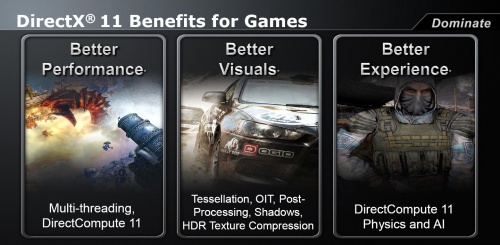
DirectX 11

AMD's pricing strategy with the Radeon HD 5000 series will be quite interesting too, as for the first time in a long while the company will be looking to take the performance crown from Nvidia. Previous generation ATI graphics cards have been unable to compete with the fastest Nvidia solutions, forcing AMD to heavily discount their products in an effort to deliver better value.

In the end the Radeon HD 4850 was competing with the much older GeForce 9800 GTX, while the Radeon HD 4870 ran somewhat unopposed at $299. At this price point the 4870 delivered an impressive level of performance, though it was overshadowed by improved GeForce GTX graphics cards over the next 12 months.
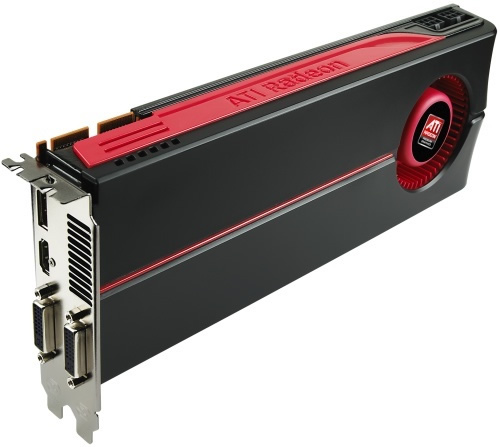
Radeon HD 5870 board

The new Radeon HD 5870 is in a very different position, though. This time around it looks like AMD is not going to be forced into a pricing war as easily -- at least not yet anyway. So for now the HD 5870 makes its debut with an MSRP of $380, while the Radeon HD 5850 is also arriving today priced at around $260.

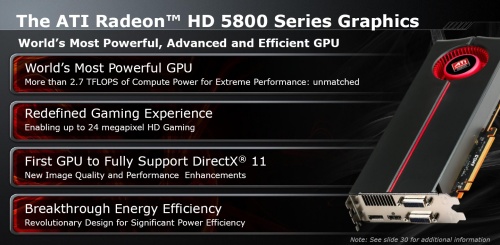
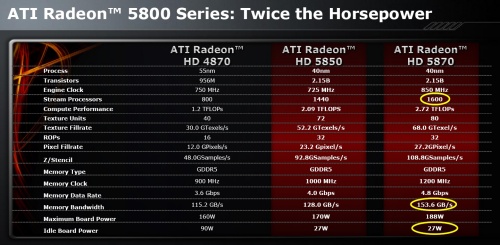
This makes the Radeon HD 5870 roughly $120 cheaper than today's undisputable performance champ, the GeForce GTX 295. It also makes it almost twice as costly as the Radeon HD 4890, however, which begs the question: is the Radeon HD 5870 really that much faster? Today we finally get to find out, as we will be comparing AMD's latest and greatest against every single high-end graphics card released over the past year. (Full Story Link)

Jun 24, 2009

NVIDIA Tesla C1060 Computing Processor – Build Your Personal SuperComputer

This is not a Video Display Card/Board

The NVIDIA Tesla C1060 transforms a workstation into a high-performance computer that can dramatically outperform a small cluster. This gives technical professionals a dedicated computing resource at their desk-side that is much faster and more energy-efficient than a shared cluster in the data center. The Tesla C1060 is based on the massively parallel, many-core Tesla processor, which is coupled with the standard CUDA C programming environment to simplify many-core programming. The Tesla C1060 allows you to keep pace with the increasing demands of the toughest computing challenges including drug research, oil and gas exploration, and computational finance and its many-core architecture meets the computational demands of applications whose complexity has outstripped the CPU’s ability to solve them. This NVIDIA HPC Computing Processor uses the only C language environment that unlocks the many-core processing power of GPUs to solve the world’s most computationally-intensive challenges. Capable of 933 GFLOPs/s of processing performance puts it near the performance of small supercomputers and 4 GB of GDDR3 memory onboard gives you a total bandwidth of 102 GB/s.

Specifications

GPU/VPU: NVIDIA Tesla C1060
Additional Features: Nvidia CUDA Technology
Video Memory: 4 GB
Memory Type: GDDR3
Memory Interface: 512-bit
Core Clock: 1296 MHz
Memory Clock: 800 MHz
Stream Processors: 240
Memory Bandwidth: 102.0 GB/sec.
Interface Type: PCI Express 2.0
Interface Speed: x16

Price US$ 1699-1799 Tigerdirect.com

Jun 23, 2009

Asus W90Vp : World’s Most Powerful Gaming Laptop

Asus W90Vp is a desktop replacement notebook that offers record-breaking performance in a stylish, aggressively-designed chassis inspired by high-performance luxury vehicles.

asus-w90vBased on an ASUS motherboard using an Intel X38 desktop chipset, the W90Vp boasts a Discrete Graphics Engine (DGE) using a pair of ATI Radeon 4870 videocards with 1GB of video memory in CrossfireX, 6GB of system memory, and an overclockable Intel Core 2 Quad-core processor for class-leading performance. The DGE with its dual Radeon cards offers mind-blowing performance, allowing it to reach over 15,000 3Dmarks in 3DMark06 in overclocked mode – a score that puts all notebooks, and some desktops, to shame.

The W90Vp is a portable movie theater with its Blu-ray drive, glorious 18.4” LCD running at full 16:9 HD 1920x1080 resolution, and an amazing Dolby-certified sound system. The sharp display features an edgeless cover for a true home theater experience that is complimented by booming audio from the integrated 5.1 Altec Lansing speaker system with a built-in subwoofer.

Seven Second Boot with Express Gate
With the W90Vp you can quickly and easily access the web, instant messages, look at photos and more with its Express Gate quick-boot environment. Just press the W90Vp’s Express Gate button and in seconds you’ll be in a fully-functional Linux environment – perfect for quickly checking your email, listening to music, or making a Skype call.

Specifications

Processor and Cache Memory
Intel® Core™2 Duo processor T9600/T9400/P8600/P8400
Intel® X38 + ICH10R Chipset, FSB=1066 MHz

Operating System
Microsoft® Vista 64 bit SP1 Premium

Main Memory
DDR2 800MHz, up to 6GB, 3xSO-DIMM slots support

Display
* 18.4” widescreen HD ultra-bright LCD display (W90Vp/W90Vn)
* 17” widescreen WUXGA ultra-bright LCD display (W90V)

Graphics Card
* ATI CrossFireX™ technology with ATI Mobility Radeon™ HD 4870 graphics, GDDR3 1024MB VRAM (W90Vp)
* NVIDIA GeForce 9800M GS, GDDR3 1024MB VRAM (W90Vn)
* ATI CrossFireX™ technology with ATI Mobility Radeon™ HD 3850 graphics, GDDR3 1024MB VRAM (W90V)

Hard Disk Drive
320 + 320GB / 250 + 250GB / 500 + 500GB (5400rpm)

Optical Drive
Blu-ray Combo/ DVD Super Multi DL

Video Camera
2.0M Pixels Auto Focus Webcam

Communication
* 802.11 Draft N wireless connection
* BlueTooth 2.1+EDR
* 10/100/1000 Mbps Ethernet
* 56k Modem

Audio
* 5.1 channel Altec Lancing speaker (w/ subwoofer),
* 2nd Generation Dolby™ Home Theater

Interface
* 1 x HDMI
* 1 x E-SATA
* 4 x USB 2.0
* IEEE 1394
* VGA-out (D-Sub)
* Headphone (SPIDIF)
* Mic-in
* 8 in 1 Card Reader
* 1 x Express Card
* 1 x CIR
* RF-in (w/ TV SKU)
* 1 x Modem jack (RJ11)
* 1 x LAN port (RJ45)

The W90Vp-A1 features an introductory MSRP of $2,499 USD and is available immediately at leading online e-tailers. (story Link)

Nvidia and Dell team up to ship Tesla-powered Personal Supercomputers

Nvidia announced today that Dell has begun shipping workstations with their Nvidia Tesla C1060 supercomputer card. Dell Precision R5400, T7500 and T5500 all offer Tesla GPU compute cards, which, according to Greg Weir, Senior Manager at Dell, “put the power of supercomputing on the desktop”.

Dell’s R5400 is a rack-mountable workstation computer designed for cluster operations. The T5500 and T7500 are tower-model workstations which sell for around $1800 base, plus the add-ons, which now include the C1060 which has an MSRP base price of around $1599.

The Tesla C1060 GPU provides raw computing power which is roughly equal to a small- to mid-range traditional CPU supercomputer cluster, though in a traditional dual-slot graphics card-sized configuration. The workloads it can operate on are not always the same as full-blown supercomputers, which can handle anything. Therefore, the C1060 does have real limitations (as do all graphics-based compute engines).

While the Tesla C1060 looks like a graphics card in appearance card, and even appears to software that way, it has no graphics port outputs. The Tesla is designed exclusively to be a compute engine which operates inside your PC.

Nvidia introduced double-precision (64-bit) floating point compute abilities with Tesla. The card itself is similar to high-end graphics cards offered by Nvidia, capable of nearly a Teraflop of dedicated single-precision compute performance (933 GFlops), with something around 80 Gigaflops in double-precision, though it is fully IEEE-754 compliant. It consumes up to 188 watts, has a memory bandwidth of 102 GB/s on a 512-bit interface 800 MHz clock, with a 1.3 GHz core clock with 240 stream processors. Each card comes with 4 GB of GDDR3 memory. Even though the Tesla C1060 card itself consumes up to 188 watts each, the reality is its compute abilities far exceed a traditional CPU-based supercomputer cluster, and for a fraction of the power and, according to Nvidia, for 1/100th the price.

The card’s dedicated compute is typically targeted at the oil and gas industries, computational finance, fluid dynamics, medical research and weather modeling — jobs which are traditionally sifting through volumes of data, computing with common operations like add, sub, multiply and divide.

It operates with Nvidia’s CUDA programming language, which exposes the compute abilities of the card through a C-like software interface.

See Nvidia’s press release, and information page about the Tesla C1060 released earlier this year in January. Nvidia also has a Tesla Personal Supercomputer Store, which shows several dedicated clusters which contain a series of Tesla cards inside, and are sold as true personal supercomputers. TigerDirect also published a YouTube video on Nvidia’s Tesla cards.

Rick’s Opinion

Nvidia’s second-generation Tesla C1060 was introduced nearly a year ago. That card is not up to today’s levels of performance and even greater performance can be obtained today through Nvidia or ATI’s highest-end graphics cards.

In fact, the Tesla is an expensive parallel compute engine, and one not required for massively parallel compute abilities thanks to the advancements in CUDA and BrookGPU libraries for Nvidia and ATI graphics cards.

Buying two or more high-end Nvidia’s GTX 2xx or ATI Radeon HD 4xxx series cards might be a wiser decision, as these cards yield well over 1 Teraflop of performance today on less power, while also providing usable graphics abilities for the workstation. And with Nvidia’s SLI and ATI’s CrossFire, the cards can be joined together for a single-instance compute appearance with even greater resources and power. (story Link)

Jun 22, 2009

NVIDIA Tesla Personal Supercomputer – Now Available 4 You


Get your own SuperComputer. Experience cluster level computing performance-up to 250 times faster than standard PCs and workstations- right on your desk. The NVIDIA® Tesla™ Personal Supercomputer is powered by up to 960 parallel processing cores and 16 GB of dedicated compute memory to solve large datasets. Based on the revolutionary NVIDIA® CUDA™ parallel computing architecture, the Tesla Personal Supercomputer puts nearly 4 teraflops of computing muscle at your fingertips.

Connoi Model : NTPSC-5400
* 4 x Tesla C1060 Computing Processor (With 4GB each Onboard Memory)
* Core 2 Quad Processor Q6600 2.40GHz, 8MB L2 Cache, 1066MHZ FSB
* Intel® 5400 Express Chipset
* 16GB FBDIMM Quad Channel RAM
* 500GB SATA Hard Disk Drive with 32MB Buffer Cache
* NVIDIA QUADRO FX570 Card
* 4 PCI Express* 1.0 x16 (electrical x16)
* 10 Hi-Speed USB 2.0, 6 back ports / 4 ports via 2 internal headers
* Up to 2 IEEE 1394a ports (1 back port, 1 via internal header)
* 6-port SATA (3.0 Gb/s) and 2-port eSATA
* Intel® Matrix Storage Technology (RAID 0, 1, 5, 10, with Intel® Rapid
* Recover Technology)
* Intel® PRO 10/100/1000 Network Connection
* Logitech Keyboard & Mouse
* ATX Chassis with 1000Watts Cooler Master Power supply
* DVD Writer

Price INR 4,79,500+  Connoiseur.com

Connoi Model : NTSP-780i
* 2 x Tesla C1060 Computing Processor (With 4GB each Onboard Memory)
* Core 2 Duo Processor E8400 3.00GHz, 6MB L2 Cache, 1333MHZ FSB
* NVIDIA nForce 780i SLI Chipset
* 8.0GB DDR2 Dual Channel RAM
* 500GB SATA Hard Disk Drive with 32MB Buffer Cache
* NVIDIA QUADRO FX570 Card
* 1 x UltraDMA133
* 7.1 Channel, Azalia (HDA)
* 2 x 10/100/1000Mbit LAN
* 1 x PS2 Keyboard
* 1 x PS2 Mouse
* 1 x Serial Ports
* 10 x USB2.0 ports (6 external + 4 internal headers)
* 2 x IEEE1394a (1 external + 1 internal header)
* Logitech Keyboard & Mouse
* ATX Chassis with 850Watts Cooler Master Power supply
* DVD Writer Price INR 2,58,500+

Intel Core i7 : No Speed Limit Processor

The best desktop processors on the planet

Intel Core i7 Processor Brilliantly fast

With faster, intelligent, multi-core technology that applies processing power where it's needed most, new Intel® Core™ i7 processors deliver an incredible breakthrough in PC performance. They are the best desktop processors on the planet.

You'll multitask applications faster and unleash incredible digital media creation. And you'll experience maximum performance for everything you do, thanks to the combination of Intel® Turbo Boost technology and Intel® Hyper-Threading technology (Intel® HT technology), which maximizes performance to match your workload.

Product information

* 2.93 GHz and 2.66 GHz core speed
* 8 processing threads with Intel® HT technology
* 8 MB of Intel® Smart Cache
* 3 Channels of DDR3 1066 MHz memory

Features and benefits
Go to the next level of multi-core performance.

Intel Core i7 processors deliver an incredible breakthrough in quad-core performance and feature the latest innovations in processor technologies:

Intel® Turbo Boost technology maximizes speed for demanding applications, dynamically accelerating performance to match your workload—more performance when you need it the most.

Intel® Hyper-Threading technology enables highly threaded applications to get more work done in parallel. With 8 threads available to the operating system, multi-tasking becomes even easier.

Intel® Smart Cache provides a higher-performance, more efficient cache subsystem. Optimized for industry leading multi-threaded games.

Intel® QuickPath Interconnect is designed for increased bandwidth and low latency. It can achieve data transfer speeds as high as 25.6 GB/sec with the Extreme Edition processor.

Integrated memory controller enables three channels of DDR3 1066 MHz memory, resulting in up to 25.6 GB/sec memory bandwidth. This memory controller's lower latency and higher memory bandwidth delivers amazing performance for data-intensive applications.

Intel® HD Boost significantly improves a broad range of multimedia and compute-intensive applications. The 128-bit SSE instructions are issued at a throughput rate of one per clock cycle, allowing a new level of processing efficiency with SSE4 optimized applications.

Intel® Core™ i7-920 Processor (2.66 GHz) Model: BX8Ø6Ø192Ø (Price $319.99 newegg.com)

Intel® Core™ i7-940 Processor (2.93 GHz) Model: BX8Ø6Ø194Ø   (Price $599.99 newegg.com )

Intel Core i7 Extreme Edition 965 3.2GHz 4 x 256KB L2 Cache 8MB L3 Cache LGA 1366 Quad-Core Processor- BX80601965 (Price $1069.99 newegg.com)

Apr 28, 2009

Nvidia GeForce 8800 GTX Graphics Card

Geforce_8800_gtx

Unless “frag life” is tattooed across your stomach, it might be hard to justify dropping $500 on a video card. But if gaming is your religion, the purchase of Nvidia’s 8800 GTX is merely an act of contrition. Packed with an ungodly amount of horsepower, this card boasts a 575-MHz core processor with 768 MB of video memory and its memory speed maxes out at 900 MHz. When plugged into our testing rig, it cranked out an amazing 29 video frames per second in the ultra-graphically-intensive Oblivion: The Elder Scrolls IV with the resolution dialed up to 1920 x1200. Even our once hot-as-hell Nvidia 6800 Ultra couldn’t even come close to this performance; it only managed 3 frames per second at the same resolution.   —Bruce Gain

WIRED Virtually any game runs faster and clearer with sharper detail. Anti-aliasing features rid most games of jagged edges. Computationally intensive physics effects boost levels of realism for images of smoke, water, and shattered glass. DVI monitor support for dual displays with up to 2560 x1600 pixels. HDTV output.

TIRED 10.5-inch card is tough to cram into even the roomiest rigs. Requires a 450-watt power supply and a PCI-Express motherboard to function. This video card alone costs more than a Wii or Xbox 360. $599 (as tested), newegg.com (Story Link)

ASUS Nova P22 Mini PC Is No Small Wonder

Asus2

If you like a liquid-cooled, oversized, overclocked, loud-as-a-harrier-jet, game-scorching PC tower, then ASUS’ new Nova P22 is not for you. At 9 in x 7.2 in x 2 in, it's a little longer and wider than a Mac Mini, in an aesthetically pleasing not-square chassis. Inside: a 1.8-GHz Core 2 Duo chip, an adequate Intel GMA 3000 graphics processor, 1 GB of ram, and a 160-GB hard drive. Almost enough oomph to run Vista — but not Doom. That’s OK, though, because the Nova was designed for your living room, not your game lair. Essentially it acts as a media streamer. We grabbed a DVI to HDMI cable, jacked it into our TV, and were using the Nova to pull movies off our home network within minutes of hitting the swank, touch-sensitive power button. Gaming be damned —Nate Ralph

Asus3_2WIRED: Decent price for the form factor. Media savvy as advertised. Analog and digital audio outs. Small and quiet. Sleek black finish is purty. 802.11n and Bluetooth 2.0 hardwired beneath its tiny carapace. Looks a lot like a Wii, if that does anything for you.

TIRED: Accidental shutdowns courtesy of the touchy power button. Strictly DVI video outputs, and this is an HDMI world. Built-in pencil holder (!) is useless if you stand the machine upright. Onboard “hi-fi” speakers could barely fill a small closet with sound. Cord management is tricky since all the inputs are on the back. Slightly underwhelming stats aren’t much good for tasks beyond media playing and sharing. $899, asus.com (story Link)

Apr 27, 2009

Key for Switch to Apple – 07

1. Should I buy a Mac-Intel PC now or wait until the new systems running the new OS X 10.5 (code named Leopard) arrive?
There's no particular need to wait because Tiger will work just fine. If you decide you want Leopard later on you have to buy.

2. Can I run Windows and Mac OS simultaneously toggling between the two?
The short answer is no. Boot Camp, Apple's downloadable application (in beta now but expected to come standard with Leopard), lets you switch between OSs but you have to reboot with each switch. You can run both OSs simultaneously with a utility, like Parallels Workstation.

3. Can I play my favorite Windows games, like Doom3, on a Mac? What other games can I play?
You'll be happy to hear that you can play your favorite Windows games on the new Mac-Intel systems, even against other Windows users. Keep in mind though that the 3D performance is directly affected by which graphics GPU you're using. And in a Mac-Intel, the highest end graphics card is the mid-range ATI Mobility Radeon X1600, which isn't as fast as the nVidia GeForce Go 7900GTX graphics system now available in systems like our Editor's Choice, Dell XPS M1710.

4. At home, I have two Windows PCs networked via WiFi. How difficult will it be to add the Mac-Intel into the mix? Will I be able to share files between my Windows PCs and my Mac-Intel whether it's running Windows OS or Mac OS?
Setting up your new Mac-Intel machine onto your PC network is easy. The Mac OS includes built-in support for Windows Sharing, which allows Macs to access files on your other Windows PCs. However, you need to enable this file-sharing option in OS X yourself since it's not a default factory setting. Enable File Sharing in Windows XP to view your Mac files.

Third party solutions are also available, like DAVE by Thursby software, which makes identifying Microsoft networks and sharing hard drives even easier in OS X.

5. Can I still use my old printer/scanner/wireless router or do I need to invest in a device?
First, check the Apple site or your peripheral manufacturer's site and see if they have Macintosh support and download the software for that specific model. Your wireless router will work with both Macs and Windows PCs without any additional software installations.

6. I do a great deal of work in Photoshop, and heard it runs slower on a Mac-Intel computer. Is this true?
Right now, yes that is true. The Universal Binary version of Adobe Photoshop CS2 is expected to address this disparity but will not be available until sometime in 2007. If you work primarily with OS X and rely heavily on Photoshop, you will notice a slow down. In that case, it might make more sense for you to wait until the next revision comes out. For a list of all the universal binary applications, check out (http://guide.apple.com/universal/).

7. Will I be able to see my IE bookmarks in both Mac OS and Windows OS?
Bookmarks are not synchronized between the Mac OS and Windows OS. You will have to import your bookmarks into the Mac OS and update them accordingly.

8. Does it slow the computer down to have both OS's open?
Technically, you cannot have both OS's open simultaneously. You can use Virtualization software like Parallels which is a PC emulator program that runs within OS X. Doing this though will place extra strain on your Mac's resources.

9. Is the Mac surround sound interface compatible with consumer electronic devices such as home theater receivers? I have a nice 5.1 living room speaker set up already.
The included optical out port on the iMac, Mac mini, and MacBook Pro gives you surround sound capability and easily connects to home theater stereos provided you have an Optical Mini Jack To TosLink Cable.

10. Can I boot Mac OS X on a PC?
No. Mac OS X is not available for Windows-based PCs. (story Link)

Mar 29, 2009

Sparkle's GTS 250 Launched in India

After introducing Sparkle's range of low-profile HTPC graphic cards, Abacus has just launched the Sparkle GeForce GTS 250.

The card comes in two variations - one with 512 MB DDR3 and another with 1 GB DDR3 video memory. Its 55nm processor boasts of a 738Mhz core speed, while the shader clock runs at 1836MHz.
The cards are available for Rs. 9,800 (512 MB) and Rs. 11,000 (1 GB). (story Link)

Feb 28, 2009

Mac OS X 10.5.7 may have Nehalem, Radeon HD 4000 support

In addition to expected fixes, Apple's upcoming 10.5.7 update to Mac OS X Leopard is now claimed to recognize Intel's newer Nehalem architecture as well as AMD's ATI Radeon HD 4000 graphics chipsets.

The reported discovery by netkas has produced just five kernel extensions for the video cards and doesn't appear to work perfectly in a bootleg installation for 10.5.6 meant for hacked Mac OS X installations. The retrofitted version doesn't recognize DVI ports fully and doesn't even recognize widescreen resolutions without third-party utilities to force the expanded screen area.
Radeon HD 4800 OpenGL ExtensionsHowever, the extensions are enough to not only identify the mid-range Radeon HD 4850 and high-end 4870 chipsets by name but to enable Core Image and Quartz Extreme acceleration of the Mac OS X interface, which would require the direct involvement of AMD, Apple or both firms to work. They also support the full OpenGL 2.1 specification for 3D graphics.
And while screen captures aren't available to support the claims as with the video hardware, the slip also hints that 10.5.7 is the first edition of Mac OS X to recognize Intel's Nehalem architecture.

Radeon HD 4800 series cards in the OpenGL Extensions viewer and Apple System Profiler. | Image credits: netkas.

Radeon HD 4800 in System ProfilerThe structure is a major overhaul of Intel's approach to processors and abandons the conventional system bus in favor of an interface that lets the processors talk directly to memory, peripherals and each other.
While it's not known when or even if Apple will definitively expose the new hardware support in the formal release of 10.5.7, such add-ons will eventually be necessary. It's commonly thought that Apple will use Nehalem-based Xeon processors at the heart of its next Mac Pro workstations and will eventually filter the technology down to its portables and mainstream desktops through Core i7 processors, which share the same essential design.
Apple has also remained comparatively dormant in its support for AMD's ATI Radeon graphics and hasn't used hardware newer than the Radeon HD 2600 found in the iMac and as an option for the Mac Pro; the technology is now approximately two generations old. (story Link)

Feb 17, 2009

PMC-Sierra's 6Gbps SAS RAID-on-chip

HONG KONG: PMC-Sierra Inc. has announced that its PM8011 SRC 8x6G 6Gbps SAS RAID-on-Chip (RoC) is shipping on the new high-performance Smart Array RAID controller cards from HP. The superior performance and flexibility of PMC-Sierra's SRC RoC enables the next-generation 6Gbps SAS RAID platform to more than double the performance of existing RAID solutions.

The new HP P212, P410, and P411 Smart Array RAID cards harness the full throughput of 6Gbps SAS and 5Gbps PCI Express 2.0 using PMC-Sierra's innovative RoCstar Contention-Free Architecture to maximize performance in equipment such as the HP ProLiant DL385 G5p and HP ProLiant DL580 G5 servers.

"IT professionals will see dramatically improved performance with the new HP Smart Array cards, enabling them to address their immediate storage needs, while future-proofing their data centers for emerging requirements," said Greg Lang, president and chief executive officer, PMC-Sierra. "Providing industry-leading performance and being first to market with end-to-end 6Gbps SAS chipsets solidifies PMC-Sierra's position as a technology leader and strengthens our relationship with HP."

According to IDC, a global provider of market intelligence, server shipments are expected to continue to grow above the 10-million-units-per-year mark by 2011. HP is the recognized server market leader by volume with market share of more than 30 per cent.

"Customers need improved RAID performance because of data center demands for higher computing power, storage throughput, and support for virtualization," said Mike Gill, vice president of Industry Standard Servers, HP. "PMC-Sierra's advanced RoC architecture integrated into the HP Smart Array RAID stack enables us to offer the industry's highest performance server and storage solutions." 

Data center demands for higher computing power, networking bandwidth and support for virtualization applications are driving system requirements for improved host bus interface, input-output, and RAID performance. PMC-Sierra's RoC device is SAS-2 compliant, doubling the storage throughput to 6Gbps and enabling a new level of system reliability, availability and scalability.  (full Story)

Feb 2, 2009

AMD Sells Handheld Graphics Unit to Qualcomm

AMD continued its previously-announced strategy of streamlining its business by agreeing to sell its handheld graphics unit to Qualcomm for about $65 million in cash.

According to the companies, the deal has already signed and closed as of Jan. 19. Under the agreement, Qualcomm will hold back an undisclosed amount for indemnification expenses, plus and make adjustments for employee-related expenses. Qualcomm has already made offers to several of AMD's handheld design teams, as part of the deal, the companies said.

The deal comes as no surprise; said in its fall analyst meeting that it was trying to sell its handheld business, as part of an overall strategy to concentrate on its core microprocessor and graphics businesses; for the graphics portion, the handheld business was not as important. Rival Nvidia also owns a handheld graphics processor, the Tegra, which the company continues to sell.

For Qualcomm, the graphics technology will be integrated into the company's other integrated cores, providing additional capabilities to Qualcomm's system-on-a-chip products. (full Story)

Feb 1, 2009

Dell XPS 625 – Phenom II X4

Based on our review of AMD's latest Phenom II processor, we noted that the new processor could make up the core of a fairly low cost gaming system. Dell has stepped up to the plate, adding an all-AMD system based on the "Dragon" platform. The Dell XPS 625 joins the XPS line of gaming rigs, and features an AMD 790GX ATX motherboard, AMD Black Edition CPUs, and Radeon HD 4000 series graphics.

xps_625_alternate_CybersSystem.blogspot The mix of components is a little odd, however. Since Dell has chosen to go with all Black Edition CPUs, you can find it equipped with the Phenom II X4 940, Phenom X4 9850+, Phenom X3 8750+, or Athlon 64 X2 5600+. You won't be able to get one with a Phenom II X4 920, however.

Equally quirky is the choice of graphics hardware: You can get your choice of a single Radeon HD 4670 or Radeon HD 4850 or dual Radeon HD 4670s or HD 4850s in CrossFire mode. What you can't get is any flavor of the Radeon HD 4870, nor can you get an X2 card (either the 4850 X2 or 4870 X2.)

Most of the other component choices are pretty straightforward, including an array of optical drives, various hard drives, and so on. Memory configurations range from 2GB to 8GB. Also available are various audio options (integrated, X-Fi, etc) as well as the somewhat controversial Killer NIC K1. You only have one choice for the operating system: Windows Vista Home Premium, but it's the 64-bit version, which we applaud. (full Story)

Jan 12, 2009

Nvidia Reveals G100M Notebook Series

With less than the usual amount of fanfare, Nvidia announced at CES the availability of new G100M series notebook GPUs for mainstream notebooks. There are three new processors in the series: the G105M and G110M GPUs for mainstream consumer notebooks, and the G130M for slightly higher-end entertainment notebooks.

Pricing wasn't mentioned, and the technical specs are slim on details. The G105M contains 8 processor cores, a 64-bit memory interface, and Nvidia says it is "55% faster than the previous product in this segment," a GeForce 9200M GE. The G110M is slightly more capable with 16 processing cores, but still maintains a 64-bit memory interface. Nvidia claims that the G110M is 35 percent faster than a GeForce 9300M GS. The GeForce GT 130M has 32 processor cores and a 128-bit memory interface. Nvidia says it is 17 percent faster than the GeForce 9600M GT.

Looking at the specs, it appears that these are not really new GPUs, per se. These could simply be new products built on the same mobile chips as their predecessors, die-shrunk to 55nm (from 65nm) and clocked up for higher performance. (full Story)

10 things to Know Before Installing Windows 7 Beta + With MP3 Bug Fix

Today’s the big day. In about 12 hours (at 12PM PST/3PM EST), Microsoft will be posting the download link for Windows 7 Beta to the general public. Remember, Microsoft said that it would only be made available to the first 2.5 million people who download the beta so be sure to download it as soon as the link goes up on this page. But before you download and install Windows 7 Beta, here are 8 very important things you should know beforehand:

10.  Windows 7 Beta is build 7000:

win7buildcropThe Windows 7 Beta being released on January 9th is Build 7000, which is exactly the same build that has been leaked on torrent sites already. Microsoft says that this beta build is near final feature-wise.

9.  Windows 7 Beta will have bugs / MP3 corruption bug fix:

It’s easy to forget that Windows 7 Beta can have possible bugs because of how stable it is. Try not to keep sensitive data on the same partition and run Windows Update right after installation. If you don’t receive the KB961367 update through Windows Update  to fix the Mp3 corruption bug, you can download it here.

8.  You can run Windows 7 under VMWare or Virtual PC instead of actually doing a full-fledged install

virtpc

In Layman’s terms, running Windows 7 under a virtual environment is like running an Operating System (OS) inside an OS, so you don’t have to worry about putting your actual computer at risk. You can start by downloading Virtual PC here for free. For further instructions please check out the tutorial here. (The tutorial is for running XP in Vista, but works for Windows 7 too. Just select Windows Vista at the OS Menu. When your mouse is in the Virtual PC area, press Right-Alt to drag your mouse back onto the screen of your current OS.) If you’re a VMWare User, many other VMWare users in community forums have said they have had no trouble getting Windows 7 to work with VMWare.

7. You don’t need to burn a DVD at all to install Windows 7:

You can use WinRAR or .iso mounting software that have extracting capabilities to extract the ISO’s contents into a folder. Once extracted, you can install Windows 7 Beta off your hard-drive just like any other OS.

6.  How to create a separate partition for your Windows 7 Beta installation:newsimpvol1

Usually, the Windows 7 Installation wizard will have an option for you to easily create a new partition for the install. If the option is not provided, here is how you can manually set up the partitions within Windows. If you are running Windows Vista, open up your Start Menu, right click Computer, and choose Manage. Then in the left-pane, open up the Storage category and select Disk Management. Right click any area of Unallocated Space and create a New Simple Volume. From there, complete the wizard to create your new volume. Once created, make sure that it is a Primary Partition.Now you’re all set and good to go with the installation.

prim

If you are running Windows XP or having problems creating a partition in Windows Vista, you can download the EASEUS Partition Manager. EPM is only compatible with Windows XP and Vista. The process for creating a new partition with EPM is the exact same as above, except that you must select to create a Primary partition as shown below:primary

5.  The driver model of Windows 7 is identical to Vista’s:

This means Windows 7 won’t suddenly bring life back to your XP-only hardware. If it didn’t work for Vista, it won’t work for Windows 7.

4.  Don’t take out those driver CDs yet…

Windows 7 contains updated hardware drivers so chances are you won’t need to install a single driver if your hardware isn’t as old as Zeus. Also don’t forget that Windows 7 would require an optimized graphics driver to take advantage of the hardware you have (WDDM 1.1) so you may want to think again before planning to force-install the latest beta drivers from Nvidia or ATI. (full Story with Thank)

Jan 10, 2009

NVIDIA glasses make home computer screen 3D

NVIDIA wants zombies to reach right out of videogames and virtually grab players by the throats.

The graphics chip specialty firm is at the Consumer Electronics Show in Las Vegas with an affordable way for just that to happen.

NVIDIA has created a kit that turns computer screen images 3D provided machines have GeForce graphics processors and one of the new-generation of high-resolution monitors launched at CES by Samsung, ViewSonic, or Mitsubishi.

"Imagine being home alone in a dark room playing; you turn a corner and zombie arms come out of the screen at you," said NVIDIA GeForce vice president Ujesh Desai.

"I call that the true pee-your-pants-moment. In shooters you see bullets whizzing past you."

Desai demonstrated the technology with a chilling bout of zombie hunting in popular videogame "Left 4 Dead." Ravines looked bottomless. Bridges appeared treacherous and zombies swarmed.

3D Vision for GeForce kits selling for 199 dollars each contain glasses embedded with circuitry and an emitter that wirelessly sends signals from computers to wearers. (full Story)

Jan 9, 2009

AMD Plans Graphics Supercomputer

AMD announced plans to develop, along with software company OTOY, what he called the "fastest graphics supercomputer" in the world in the second half of 2009. It will be known as the Fusion Render Cloud. It's unclear whether the rendering services will be used for game creation, delivery, or both.

LAS VEGAS, Jan 8 (Reuters) - U.S. chip maker Advanced Micro Devices Inc, facing a slump in demand for personal computers, is hoping the old adage that entertainment is recession proof will prove true this year.

At the Consumer Electronics Show in Las Vegas on Thursday, AMD Chief Executive Dirk Meyer showed off new technology for advanced computer graphics in video games and films, in what the company called the convergence of the "cinematic and the interactive."

Meyer said AMD's new chips will help blur the lines between games and films, helping them look much more life-like.

He also announced plans to develop, along with software company OTOY, what he called the "fastest graphics supercomputer" in the world in the second half of 2009. The supercomputer could help film studios make movies more interactive and gaming companies increase realism, Meyer added.

But the upbeat tone of his presentation was at odds with the half-empty Las Vegas Hilton Theater and the chip industry's somber mood.

Just a day earlier, AMD's chief rival Intel Corp (INTC.O), the world's largest chip maker, stunned the market with its second revenue warning on the fourth quarter, saying demand for personal computers was even worse than it feared. Intel and AMD make nearly all the microprocessors for the world's 1 billion PCs.

Meyer said the consumer electronics industry is in the middle of a "sea change" and called the current economic situation "challenging," "volatile" and "unprecedented."

"Optimism has been a little more difficult to achieve these days," he said.

AMD laid off 600 workers in its most recent quarter from a total workforce of about 15,500 as the sector started to contract.

The company has posted losses for eight consecutive quarters, in part due to delays in rolling out new chips that resulted in AMD falling behind Intel technologically.

But AMD is hiving off its manufacturing plants into a joint venture with Abu Dhabi to cut costs and get a cash injection, and its last quarterly results were better than Wall Street had expected thanks to a new graphics chip.

In difficult times, Meyer said AMD can set itself apart because it is the only chipmaker that can deliver both x86 and graphics chips, which is the key to its Fusion chip platforms.

Fusion is AMD's name for technology that merges a graphics processing unit and central processing unit on a single chip. The effort springs from AMD's $5.4 billion purchase of graphics chipmaker ATI Technologies in 2006. (full Story)

Razer Mamba Gaming Mouse Is Lag Free

The Razer Mamba looks like a winner for gamers or anyone looking for a high-performance mouse: Lag free, 2.4GHz wireless or wired, with teflon base, and 1ms polling rate, rather than the usual 8ms.

The Razer Mamba also includes a host of features like Razer Synapse™ on-board memory that lets gamers store and bring their mouse settings wherever they go. And the world’s fastest 5600DPI Razer Precision™ 3.5G Laser sensor, the Razer Mamba wireless gaming mouse lets gamers move with lightning speed and precision to easily escape from becoming prey.

Cost: US- $129.99; Europe- €129.99
Available: Razerzone.com Feb, 2009, Worldwide Q1 2009

Features:
• Detachable seven-foot, lightweight, braided cord
• Battery life & DPI stage indicator
• Ultra-large non-slip Hyperesponse™ buttons
• Ergonomic design
• Zero-acoustic Ultraslick™ Teflon feet
Specifications:
• Gaming Grade Wireless Technology
• Dual Mode Wired/Wireless Functionality
• Razer Synapse™ On-board Memory
• 5600DPI Razer Precision™ 3.5G Laser sensor
• 1000Hz Ultrapolling™ / 1ms response rate
• Up to 200 inches per second*/ 50g acceleration
• Approximate size: 128mm x 70mm x 42.5mm
• Battery Life: 14hrs (continuous gaming); 72hrs (normal gaming usage)
*Depends on surface used (full Story)

Dell Studio XPS 16

Dell wants you to know that its latest Studio XPS line brings with it a level of prestige—a refined segment for customers who seek luxury and style. The Dell Studio XPS 16 ($1,804 direct) accomplishes just that, succeeding the XPS M1530 as Dell's new bad-boy media center. Seeing how every laptop maker is putting in the same processors and advertising 4GB of memory, home-theater features, and big screens, Dell decided to raise the bar with the XPS 16. Design is its biggest differentiator, as it uses not just one but a number of the hottest techniques in manufacturing. Its display is none too shabby as well. Photographers and professionals can reap the benefits of the RGB LED widescreen and the 1080p resolution without paying outrageous prices for them. For this, the XPS 16 reigns as our new Editors' Choice for the media center category, trumping the HP HDX16t.

The lid is clearly one of the main attractions. It takes its cues from trendsetters like the aluminum Apple MacBook Pro 15-inch (Dual Graphics), the leather-clad ASUS U2E-A2B, and the HP HDX16t with its polished exterior, mixing a little bit from each of these laptops in a manner reminiscent of an exotic drink: one part black leather trimming, one part aluminum accent, and two parts lacquered top. The lacquered part is defined by a process called In-Mold Decoration, similar to the one perfected in the HDX16t, which allows different designs to be placed between the glossy coating and the magnesium alloy skeleton.

At 6.9 pounds, the XPS 16 is not an ideal companion for road warriors, although it's more portable than the Gateway MC7803u (7.7 pounds) and the Acer Aspire 6930G-6723 (7.2 pounds). It's a smidge heavier than the HDX16t, and for good reason: The XPS 16 uses a big 85-Wh (nine-cell) battery, as opposed to the HP's 56-Wh (six-cell) option. The XPS 16 has its own six-cell option, which would bring its weight down to 6.5 pounds, thus making it as light as the Sony VAIO VGN-FW198UH (6.4 pounds). I'll get to why the nine-cell battery is the best option a little later. (full Story)